
 07971190613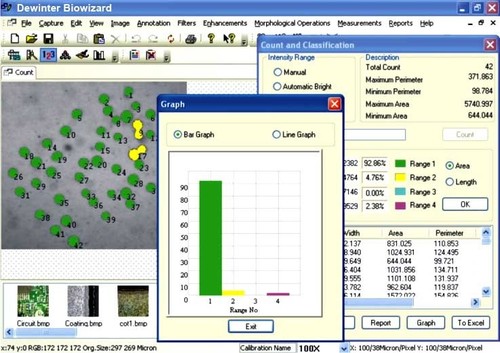
Image Analysis Software
20000.00 - 80000.00 INR
Product Details:
- Support System Windows, Linux
- Usage Laboratory, Research, Industrial
- Compatible System PC, Workstation
- Interface Type Graphical User Interface (GUI)
- Language Support English
- Security Features High Encryption
- Capacity (Person) Single User, Multi User
- Click to View more
X
Image Analysis Software Price And Quantity
- 20000.00 - 80000.00 INR
- 1 Unit
Image Analysis Software Product Specifications
- Single User, Multi User
- Image Processing
- High Encryption
- English
- PC, Workstation
- Graphical User Interface (GUI)
- Digital Software
- Windows, Linux
- Laboratory, Research, Industrial
Image Analysis Software Trade Information
- Telegraphic Transfer (T/T), Cheque
- 1 Unit Per Day
- 2-3 Days
- All India
Product Description
Backed with highly skilled software engineers, we have gained expertise in developing reliable Medical Software that enables to identify objects in an image & helps in counting and obtaining several attribute measurements. This also helps as a decision support system for the hospital authorities for creating complete health care guidelines. Developed using the most advanced technology by our highly skilled professionals, the offered software can easily install and is simple to use. This user friendly Medical Software can be availed from us at very nominal price.
DEWINTER MEDICAL SOFTWARE : BIOWIZARD
Measurement of Length, Roundness, Perimeter, Area, Area %, Diameter, Width, Segmentation by coloring, Histogram Channel and various other morphometery Analysis, Geometrical and Densitometry Analysis. Calculate density of any area per line draw Histogram, Percentage Area of multiple threshold levels, Count and Classify, Area of interest convert automatically RGB Images into Grayscale for required analysis.
IMAGE EDITING
- Cut, Copy, and Paste.
- Selected copy by free hand AOL controlled by four arrow keys available on keyboard or mouse with zoom preview.
- Crop, duplicate, restore
- Resize
- Compression
- Conversion to other format BMP, JPG, TIF, PNG, GIF & PSD
- Flood fill or spray with selected color at selected portion.
- Grid creation; 5X5, 10X10 & 100X100 lines.
- Drawing tool curve, line, square, and circle with node control and provision to change color & thickness of the line.
- Write text in any color or font.
- Pointer to place on an object in four directions with provision to change its color & thickness.
- Eraser works only on line, arrow or on any drawing tool.(not on original image)
- Camera Lucida
- Montage feature to merge stored image together. Useful to Merge different focuses of same image.
- Image stitching.
- Highlighter.
- Pixel by Pixel Correction by key board.
- Multiple image folder with Search facility.
- Filter application on selected area
VIEW
- Zoom in/out
- Zoomed preview
- Rotation at 90, 180,270 or custom
- Image flipping; horizontal or vertical axis
- Intensity histogram.
- Image Information
- Redo/Undo on all operations.
- Ruler in Various units.
- Slide show.
IMAGE PROCESSING
- Background subtraction and contrast enhancement of color or monochrome images
- Arithmatic image functions (Boolean Math; Add, AND, OR, XOR, DIFF, MIN, MAX, +, -, /, *, And Simple).
ROUTINE FILTERS
- Invert, Brightness, Contrast, Hue, Saturation, Blur, Noise Remove, Emboss, Engrave, Gamma R, Gamma G, Gamma B, Yellow, Magenta, Cyan, Mosaic, Smooth, Desaturation, Pseudo Color, Colorize, Oilify, Despeckle, Postarize.
SPECIAL FILTERS & KARNELS
- High Boost, High Spatial, Low Pass Spatial, Ranking (Max, Med, Min), Point detection, Line detection, Homogeneity
EDGE DETECTION
- Laplacing, Sobel, Kirsch, Prewitt Gradient, Shift & Difference, Combine, Contrast Base, Quick, Range And Variance.
MORPHOMETERY
- Skelotizing, Pruning, SKIZ, Histogram Equalization, Histogram Smoothing, Histogram Peak, Histogram Valley, Segmentation by Over/Under and Quantized, Contouring, Dilation / Erosion on Binary, Gray & colored Images, Opening/ Closing on Gray & Binary Images, Special Opening/Closing, Split/Combine Of RGB, YUV, YIQ, XYZ, & HSL, Changing any Image to 1, 4, 8 & 24 Bits, Medial Axis. Transformation, Halftone.
- Image Addition, Image Average, Image Subtraction, Image Multiplication.
MEASUREMENT
- Spartial calibration
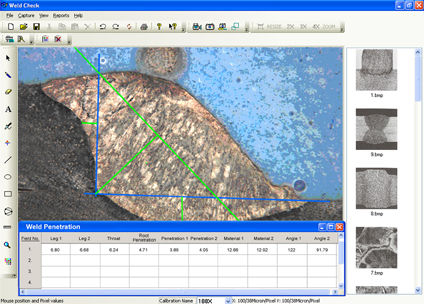
- Line measurements for Distance, Length, Width, Perimeter, Angle, Three Point Radius.
- Area by enclosed line controlled by four arrow keys available on keyboard arrows with zoomed preview.
COUNT AND CLASSIFICATION
- Identification of objects in an image, count them, obtain several features measurements. Objects identification by user or automatically. User defined classification on basis of size or intensity.
THRESHOLD PARTICLE MEASUREMENT
- Manual, Auto bright and Auto dark methods to identity intensity range defined object to be measured. Various calculation & measurements available for selected Particle are; Dimensions, Area, Perimeter, Ferrite Length, Min/Max Radius, Thread Length, Thread Width, Fiber Length, Fiber Width.
MORPHOMETERY
- Roundness, Shape, Orientation, Elongation, Equal Circular Diameter, Equal Sphere Volume.
LOCATIONAL
- Measure area fraction & volume fraction. Identify multiple phases within Microstructure. Also delineate phases from the histogram.
REPORT
- Three options: Direct printout with original image processed Image & Tabular results
- Export to MS Office or Excel for further modification.
APPLICATION AREAS
-
Pathology
-
Histo-Pathology
-
Botany
-
Zoology
-
Microbiology
-
FNAC Reporting
-
Hematology
-
Anatomy
Cutting-Edge Image Processing
Our software empowers users with advanced image analysis tools suitable for research, industrial, and laboratory purposes. It enables detailed visualization, manipulation, and interpretation of images for precise outcomes.
Enhanced Data Security
Leveraging high encryption standards, this software protects sensitive image data against unauthorized access, making it ideal for environments that prioritize confidentiality and compliance.
User-Friendly GUI for Broad Accessibility
Featuring an intuitive graphical user interface, the software ensures a seamless user experience, making complex image processing accessible to both novices and experts.
FAQs of Image Analysis Software:
Q: How does the software ensure the security of image data?
A: The software incorporates high-level encryption protocols, safeguarding all image files and associated data from unauthorized access or breaches during processing and storage.Q: What types of operating systems does the software support?
A: It is compatible with both Windows and Linux operating systems, enabling flexible integration on a variety of PC and workstation hardware.Q: When should this software be used?
A: This image analysis software is ideally used when you require precise and secure image processing in laboratory, research, or industrial settings, whether for quality control, data analysis, or scientific research.Q: Where is the software commonly implemented?
A: The software finds applications in laboratories, research institutions, and diverse industrial environments across India and internationally.Q: What is the process for using the image analysis features?
A: Users can import image files through the GUI, apply analytical tools for processing, and export results securely, all within an encrypted environment, ensuring data integrity and user privacy.Q: How does the software benefit multi-user environments?
A: With options for both single and multi-user modes, the software enables collaborative work, streamlining workflows and enhancing productivity in team-based projects.Q: What language support is available for users?
A: Currently, the software supports English, making it accessible to a wide user base in research, industry, and manufacturing sectors.Tell us about your requirement

Price:
Quantity
Select Unit
- 50
- 100
- 200
- 250
- 500
- 1000+
Additional detail
Mobile number
Email

Other Products in 'Biological Image Analysis Software' category




Inquiry Now
Contact Details

- 2/15, IIIrd Floor, West Patel Nagar, Main Patel Road, New Delhi - 110008, India
- Phone : 07971190613
- Mr. Rajiv Luthra (Director)
- Mobile : 07971190613
- Send Inquiry
 Send Inquiry
 Send Inquiry
 Send SMS
 |
DEWINTER OPTICAL INC.
All Rights Reserved.(Terms of Use) Developed and Managed by Infocom Network Private Limited. |
