
 07971190613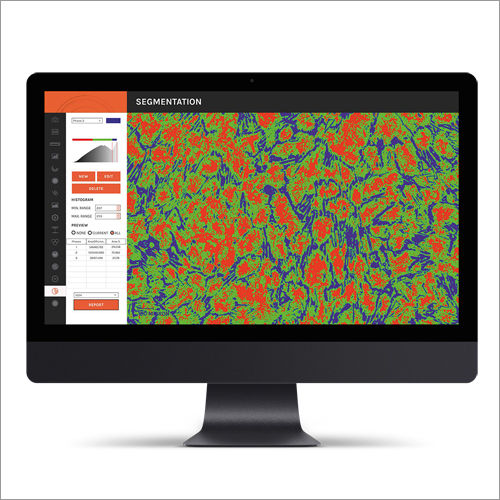
Material Analysis Software
20000.00 - 80000.00 INR
Product Details:
- Capacity (Person) Single User
- Language Support Multilingual
- Usage Industrial and laboratory material examination
- Interface Type Graphical User Interface (GUI)
- Security Features User authentication and data encryption
- Compatible System Windows 7/8/10
- Type Material Analysis Software
- Click to View more
X
Material Analysis Software Price And Quantity
- 1 Unit
- 20000.00 - 80000.00 INR
- CSV, PDF, XLS
- Online Automatic Update
- Available
- 2GB RAM minimum, 1.5GHz processor
- Annual/Perpetual
- CD or Download
Material Analysis Software Product Specifications
- User authentication and data encryption
- Industrial and laboratory material examination
- Graphical User Interface (GUI)
- Windows 7/8/10
- Material Analysis Software
- Single User
- Material analysis and data evaluation
- Multilingual
- CSV, PDF, XLS
- Online Automatic Update
- Available
- 2GB RAM minimum, 1.5GHz processor
- Annual/Perpetual
- CD or Download
Material Analysis Software Trade Information
- Telegraphic Transfer (T/T), Cheque
- 1 Unit Per Day
- 2-3 Days
- All India
Product Description
Material Analysis Software is a smart digital system that allows you to determine various properties of test samples. It is highly demanding for educational purposes due to its extensive features. This system is compatible with various computers and laptops. It has various features that allow you to get quick and accurate results. Customers can get installation service of Material Analysis Software from us at a reasonable price range.
Seamless Installation & Updates
Install the software via CD or download, allowing flexible setup in laboratory and industrial environments. Automatic online updates ensure that the latest features and security enhancements are always in place, minimizing maintenance concerns and manual interventions.
Intuitive and Secure Data Analysis
Built with a graphical user interface, the software simplifies complex material analysis tasks. Equipped with user authentication and robust data encryption, all information remains confidential and protected throughout the data evaluation process.
Comprehensive Export and Compatibility Options
Effortlessly export analyzed data to CSV, PDF, or XLS formats to streamline reporting and integration with other systems. The software runs smoothly on Windows 7/8/10, accommodating most modern workstations and providing single-user capacity for focused tasks.
| Type | Offline |
| Operating System | For Windows |
| Download Option | Free Demo/Trial Available |
| Brand | Dewinter |
| Free Required RAM | 4GB |
| Provide Installation Service | Yes |
| Training | In Person |
| Customizable Templates | Yes |
| Language Support | English/Hindi |
| Architecture | 32/64 Bits |
| Country of Origin | Made in India |
FAQs of Material Analysis Software:
Q: How can I install the Material Analysis Software on my system?
A: You can install the software either from the provided CD or by downloading it from the official website. Simply follow the on-screen prompts. Ensure your Windows system meets the minimum requirements: 2GB RAM and a 1.5GHz processor.Q: What data export formats does the software support and how do I use them?
A: The software allows data export in CSV, PDF, and XLS formats. Once your analysis is complete, select your preferred format from the export menu to generate comprehensive reports, which are compatible with standard office applications.Q: When and how does the software receive updates?
A: The software is equipped with online automatic updates. These are applied periodically whenever new features, improvements, or security patches become available, ensuring you always operate with the latest version without manual intervention.Q: Where can I get technical support if I encounter issues?
A: Technical support is available both online and offline. You may contact the support team via email, chat, or phone for immediate assistance, ensuring smooth operation whether youre on-site or remote.Q: What are the security features built into the software?
A: To protect sensitive data, the software integrates user authentication protocols and advanced data encryption, safeguarding your materials analysis information against unauthorized access.Q: How does the trial version work and what are its benefits?
A: A trial version is available for evaluation. It allows users to explore core features and assess the softwares suitability for their specific material analysis and data evaluation needs before committing to an annual or perpetual license.Q: What is the main advantage of using this software for industrial and laboratory analysis?
A: The software combines an intuitive GUI with robust security and powerful export capabilities, facilitating precise and efficient material analysis. It enhances productivity and data reliability, meeting the diverse requirements of industrial and laboratory users.Tell us about your requirement

Price:
Quantity
Select Unit
- 50
- 100
- 200
- 250
- 500
- 1000+
Additional detail
Mobile number
Email

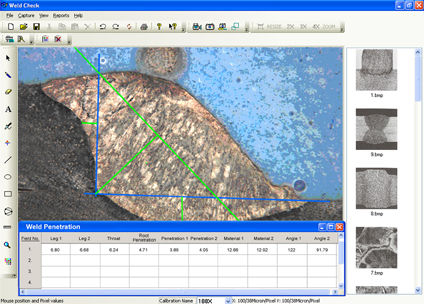
Other Products in 'Biological Image Analysis Software' category




Inquiry Now
Contact Details

- 2/15, IIIrd Floor, West Patel Nagar, Main Patel Road, New Delhi - 110008, India
- Phone : 07971190613
- Mr. Rajiv Luthra (Director)
- Mobile : 07971190613
- Send Inquiry
 Send Inquiry
 Send Inquiry
 Send SMS
 Call Me Free
 |
DEWINTER OPTICAL INC.
All Rights Reserved.(Terms of Use) Developed and Managed by Infocom Network Private Limited. |
