
 07971190613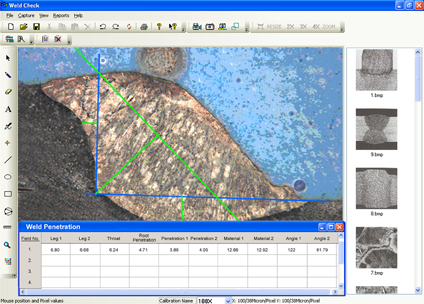
Hardness Analysis Software
20000.00 - 80000.00 INR
Product Details:
- Security Features Password Protection
- Interface Type USB
- Compatible System Windows
- Language Support English
- Capacity (Person) Single User
- Type Software
- Application Laboratory Hardness Testing
- Click to View more
X
Hardness Analysis Software Price And Quantity
- 20000.00 - 80000.00 INR
- 1 Unit
Hardness Analysis Software Product Specifications
- Software
- Laboratory Hardness Testing
- Password Protection
- Single User
- English
- USB
- Windows
Hardness Analysis Software Trade Information
- Telegraphic Transfer (T/T), Cheque
- 1 Unit Per Day
- 2-3 Days
- All India
Product Description
With sincere intentions to preserve and uplift our reputation in the market, we bring forth highly efficient Weld Penetration Analysis Software that is deal for making tough measurements of welded parts. This software is very user friendly and can be easily customized as per the application requirement of the clients. Also, our offered Weld Penetration Analysis Software helps in making accurate measurements by not getting affected with the zooming option. In order to avoid any kinds of run time errors, this software is parallel tested while developed by our software testing engineers.
Hardness Analysis Software
Weld Check software is a powerful easy-to-use tool that enhances your ability to quickly and efficiently handle your most critical welding measurement and documentation software needs. Your workflow and productivity are greatly improved. Weld Check has been designed with your welding cross-section measurement needs in mind. Weld Check is measurement module allows you to quickly measure such items as your fillet welds, throat, leg lengths and penetration.
Use Weld Check Measurement Tolerance indicator to improve performance by having the software automatically tell you if a measurement is out of the tolerance range.
The following report concerns the analysis of a fillet weld, a weld of approximately triangular cross section joining two surfaces at approximately right angles to each other. Important measurements made by the distance from the root if the fillet to the center of the face (or throat), the distance from the root of the joint to the junction between the exposed surface of the weld and the base metal (or leg), the angles and the root penetration.Measurements that could have been done with the same ease or similar sample are among others : depth of HAZ (heat affected zone), area of HAZ, joint penetration, phase counting, etc
The measurement remain unaffected if the image is zoomed for better accuracy. T he magnifier tool is also available which can be switched on any part of image. The tool zooms only the region surrounding the cursor allowing to increase the drawing precision while still seeing the whole sample.
Image analysis system can measure a sequence of specific characteristics or welded parts. The system brings the good tool with the good color when it the time for the operator to use it.
Advanced Security for Data Integrity
User data and test results are safeguarded with comprehensive password protection, ensuring only authorized personnel can access and manage sensitive information. With security as a top priority, the software helps laboratories maintain strict compliance with internal protocols and industry standards, minimizing risks associated with data breaches.
Optimized for Laboratory Hardness Testing
Purpose-built for laboratory environments, the software streamlines hardness measurement processes and analysis. Integration with laboratory instruments and easy data transfer via USB provide a seamless testing experience, while the intuitive interface reduces learning time for single users.
Windows-Compatible and User-Friendly
The software is fully compatible with Windows operating systems, ensuring smooth installation and reliable operation. English language support and clear navigation make it accessible, while single-user licenses promote personalized accountability in lab settings.
| Brand | Dewinter |
| Free Required RAM | 4GB |
| Provide Installation Service | Yes |
| Training | In Person |
| Customizable Templates | Yes |
| Language Support | English/Hindi |
| Architecture | 32/64 Bits |
| Country of Origin | Made in India |
FAQs of Hardness Analysis Software:
Q: How does the software benefit laboratory hardness testing processes?
A: The software streamlines data collection, analysis, and reporting for laboratory hardness testing. It provides precise, repeatable results, enhances workflow efficiency, and reduces manual errors, making laboratory operations more productive.Q: What security features does the software provide?
A: The software is equipped with password protection, ensuring only authorized users can access or modify test results. This helps maintain data integrity and prevents unauthorized access to sensitive laboratory information.Q: When should I use this software for hardness analysis?
A: You should use this software whenever you require accurate and efficient hardness testing in a laboratory setting. It is ideal for both routine testing and detailed analysis, especially where secure data management is needed.Q: Where can the software be implemented effectively?
A: The software is best suited for laboratory environments conducting material hardness tests. It is especially effective in research institutions, industrial labs, and quality control departments that require reliable data protection and single-user management.Q: How is the software installed and connected to laboratory devices?
A: Installation is straightforward on any Windows system. The software interfaces with laboratory hardness testing equipment via a USB connection, allowing seamless data transfer and immediate analysis after setup.Q: What are the steps involved in using the software for a hardness test?
A: First, connect your hardness testing device via USB, log in using your secure password, and initiate your test. The software captures and analyzes the data in real-time, and you can then view, store, or export test results as needed.Q: What advantages does single-user capacity offer for labs?
A: Single-user licensing ensures accountability and data traceability. It allows labs to assign responsibility to individual users, making it easier to track data entries and comply with regulatory requirements.Tell us about your requirement

Price:
Quantity
Select Unit
- 50
- 100
- 200
- 250
- 500
- 1000+
Additional detail
Mobile number
Email

Other Products in 'Biological Image Analysis Software' category


Inquiry Now
Contact Details

- 2/15, IIIrd Floor, West Patel Nagar, Main Patel Road, New Delhi - 110008, India
- Phone : 07971190613
- Mr. Rajiv Luthra (Director)
- Mobile : 07971190613
- Send Inquiry
 Send Inquiry
 Send Inquiry
 Send SMS
 Call Me Free
 |
DEWINTER OPTICAL INC.
All Rights Reserved.(Terms of Use) Developed and Managed by Infocom Network Private Limited. |
